Artikel Tebaru :

Games

Software

Tips and Trick

Tampilkan postingan dengan label Software. Tampilkan semua postingan

Adobe Dreamweaver CS6 12.0 Build 5808 - Full Crack


Adobe Dreamweaver CS6 12.0 merupakan aplikasi yang digunakan untuk membuat dan mengedit bahasa pemograman, seperti HTML dan CSS. Software ini banyak digunakan oleh orang untuk membuat template pada blog maupun Web.

Adobe Dreamweaver CS6 web design software provides an intuitive visual interface for making and editing HTML websites and mobile apps. Use Fluid Grid Layout designed for cross-platform compatibility to create adaptive layouts. Review designs with Multiscreen Preview before publishing.

Fitur2 :

  • Fluid grid layout
  • Improved FTP performance
  • Adobe Business Catalyst integration
  • Enhanced jQuery Mobile support
  • Updated PhoneGap support
  • CSS3 transitions
  • Updated Live View
  • Updated Multiscreen Preview panel

Persyaratan minimum:

  • Intel Pentium 4 or AMD Athlon® 64 processor
  • Microsoft Windows XP with Service Pack 2 (Service Pack 3 recommended); Windows Vista® Home Premium, Business, Ultimate, or Enterprise with Service Pack 1; or Windows 7
  • 512MB of RAM
  • 1GB of available hard-disk space for installation; additional free space required during installation (cannot install on removable flash storage devices)
  • 1280×800 display with 16-bit video card
  • Java™ Runtime Environment 1.6 (included)
  • DVD-ROM drive
  • QuickTime 7.6.6 software required for HTML5 media playback
Download :
Sekian dulu postingan saya kali ini, semoga bermanfaat bagi kalian semua...
Terimakasih atas kunjungannya ^_^

Connectify 3.3 Pro Full Version


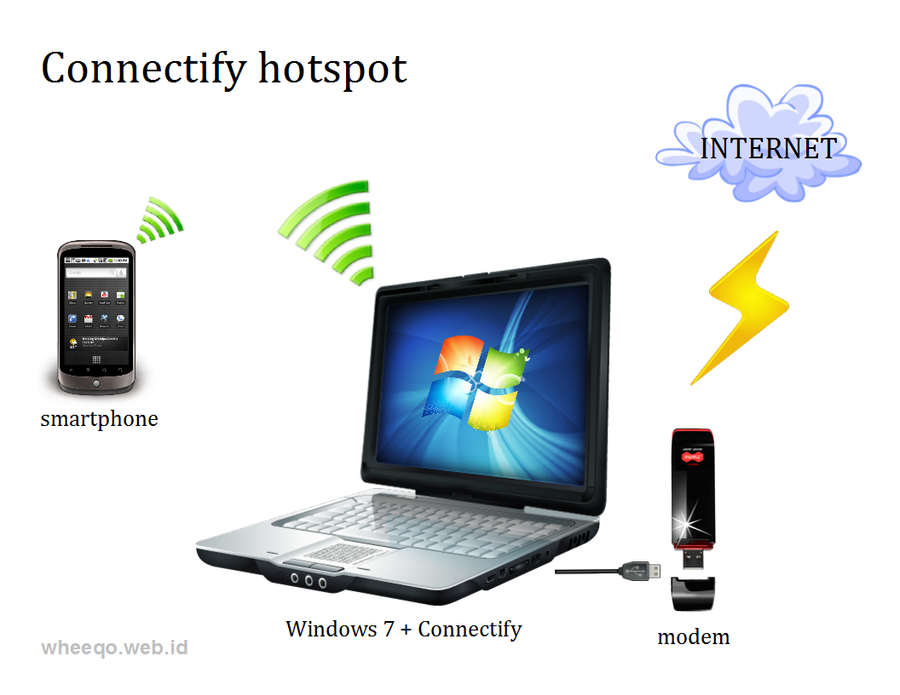
Connectify 3.3 Pro Full Version - Siapa yang belum tahu Connectify 3.3 Pro ?, Pasti sobat blogger semua sudah tahu kan ?. Namun barang kali ada yang belum tahu apa itu Connectify 3.3 Pro Full Version akan saya jelaskan sedikit. Ini merupakan sofware yang dapat digunakan untuk membagi koneksi melalui wifi yang ada di pc sobat, ya seperti hotspot gitu lah. :)
Selain itu Connectify 3.3 Pro Full Version juga bisa untuk sarana berbagi atau share file yang bersifat umum dan kirim file ke pc lain.

Screenshot :

 
Fitur Pro :
  1. Software Access Point
  2. Transform laptop anda menjadi hotspot Wi-Fi nyata, berbagi koneksi Internet tersedia 
  3. Berbagi Internet dari Wi-Fi lain Jaringan
  4. Tampilan Komputer Terhubung / Perangkat
  5. Tahu siapa dan apa perangkat yang terhubung ke Hotspot Connectify Anda setiap saat. 
  6. Kontrol Firewall Sederhana
  7. Mengatur Internet dan jaringan lokal (LAN) hak akses untuk setiap perangkat yang terhubung. 
  8. Share Wi-Fi dari 3G/4G Networks
  9. Internet Berbagi dari kartu 3G/4G di samping berbagai kartu USB lainnya
  10. Drag dan Drop File Transfer
  11. file Mudah berbagi dengan perangkat yang terhubung ke hotspot Anda serta komputer lain di jaringan berjalan Connectify. 
  12. Service Discovery
  13. Memindai semua perangkat pada Hotspot Connectify Anda untuk berbagi folder atau drive yang tersedia, web server, iTunes, dan layanan remote lainnya. 
  14. Fully-Customizable SSID
  15. Merubah Nama hotspot Anda sesuai yang Anda inginkan
  16. Fungsi Repeater
  17. Perluas jangkauan rumah Anda atau router kantor dengan menggunakan nama jaringan identik dan password. 
  18. Seleksi AutoInternet
  19. Bila diatur ke "Otomatis," Connectify Pro cerdas memilih yang koneksi internet untuk berbagi dan membuat perubahan konfigurasi yang diperlukan untuk hotspot Anda 
Download :
Sekian artikel saya kali ini, beritahu teman anda bila blog ini bermanfaat bagi anda.
Terima Kasih ^_^

Nitro PDF Profesional 7.3.1.4 (32 dan 64 bit) with Crack


Nitro PDF Profesional 7.3.1.4 (32 dan 64 bit) with Crack - Nitro PDF Profesional 7.3.1.4 merupakan sebuah software yang berfungsi untuk membaca, mengedit, dan mengkonversi file PDF ke Microsoft word, excel, image, dll. Nitro PDF Profesional juga dapat menggabung beberapa file PDF menjadi satu saja. Hasil konversi Nitro PDF Profesional tergolong baik, apalagi jika file PDF yang dikonversi sebelumnya adalah file office yang dibuat PDF maka hasilnya akan sama persis (tidak acak-acakan).

New features :

  • Convert PDF for reuse in Microsoft Word, WordPerfect, OpenOffice, GoogleDocs, and more with the most accurate, industry-leading PDF conversion technology. Create highly-editable files that retain page layouts, working tables, correctly justified paragraphs, drawing shapes, and more.
  • Create PDF files up to 50% faster
  • Summarize comments for paper-based viewing
  • PDF/A compliance support
  • Document management system (DMS) integration support
  • Grid and Snap-to-Grid tools
  • Full control over the PDF creation process
  • Major user interface improvements, including a new, easy-to-access Navigation pane, a Comments List panel for working with more detailed comments, and a dedicated Text Editing context ribbon for inserting and updating text.
  • Major improvements to the underlying PDF library for faster processing of all files.
Screenshot :

System requirements:
  • Desktops: Windows® XP, Windows® Vista, Windows® 7 (x64 editions supported)
  • Servers: Windows® Server 2003, Windows® Server 2008, Windows® Server 2008 R2 (Terminal Server and Citrix XenApp/Access Essentials configurations supported.) For more on server-side deployment, check out the Citrix and Terminal Server software page.
  • Processor: 1 gigahertz (GHz) or faster processor
  • RAM: 512 MB system memory (1 GB recommended)
  • Display: 1024×768 screen resolution
  • Installer size: 43 MB
  • Installation footprint: 163 MB
  • Available space: Up to 520 MB of available hard drive space
  • Microsoft Office 2003 or newer (required for Microsoft Office integrated features)
  • Microsoft .NET Framework 2.0 (or above)
Download :
Sekian artikel saya kali ini, beritahu teman anda bila blog ini bermanfaat bagi anda.
Indahnya berbagi. Terima Kasih  ^_^

IDM 6.11 Beta with Patch


IDM 6.11 Beta with Patch - Internet Download Manager (IDM) adalah sebuah aplikasi untuk mengkoordinir file2 donwnload dan mengefisienkan bandwidth untuk proses download. IDM memang sebuah aplikasi yang tergolong cepat soal update aplikasinya. Baru kemain update versi final sekaran sudah ada yang versi beta terbarunya. :)) 

Ada apa yang baru di IDM versi 6.11 beta ini ???
  • Support dengan firefox 13
  • Support dengan SeaMonkey 2.8
  • Peningkatan Fitur Browser lanjutan
  • Fixed bug
Cara aktivasi IDM dengan patch :
  1. Disable dulu antivirus yang anda gunakan.
  2. Ekstrak dulu semua file termasuk file patch.
  3. Instal IDM, bila sudah ada versi sebelumnya jangan lupa di close terlebih dahulu.
  4. Bila muncul pesan "fake number" di close saja.
  5. Klik kanan file patch, klik patch
  6. Selesai
Download IDM v.6.11 Beta :
Sekian artikel saya kali ini, jangan lupa beri tahu teman anda jika blog ini bermanfaat bagi anda.
Terima Kasih ^_^

DAEMON Tools Pro 5 - with Keymaker


Yap ketemu lagi dengan saya. Kali ini saya akan berbagi tentang tips menjalankan file CD rom di PC. Caranya adalah menggunakan software tambahan yaitu Daemon tool. Ini digunakan untuk membuka file image CD. Image CD adalah hasil duplikasi sebuah CD ataupun pengkopian CD yang tidak bisa dibaca dengan Windows ataupun Linux secara langsung. Hal ini berbeda dengan file biasa yang dieksplorer bisa di-klik dan di buka langsung tanpa perlu pusing berpikir bahwa fileyang telah di-klik tersebut bisa jalan ataukah tidak. 

Untuk CD-CD program, perlakuan file-file yang ada didalamnya tidak selalu bisa di copy-paste dan jalankan sebagaimana di flashdisk. Katakanlah anda memiliki master CD program game dari EA atau beberapa game dan program original, dipastikan jika seluruh CD di copy-paste ke Harddisk, tidak akan bisa berjalan normal dan meminta CD asli.Untuk itulah, proses pengcopyan CD versi Image diperlukan untuk bisa menjalankanprogram di CD agar utuh dan tidak ada eror. Sayangnya, jika anda bolakbalik memasuk-keluarkan CD dari CD rom tentunya akan melelahkan. Nah, dengandaemon tool, persoalan itu rampung.Image CD ada banyak, ada yang berekstensi .img. .nrg, .ccd , atau .sol tergantung software apa yang gunakan dalam peng-image-an CD anda.

Screenshot :

Key Features :
  • auto update;
  • creates *.iso and *.mds images using preset profiles;
  • emulates up to 32 CD/DVD/HD DVD/Blu-ray drives;
  • supports up to 2 virtual IDE devices;
  • burning verify functionality;
  • compresses images;
  • performs image mounting to physical folders;
  • protects image with password;
  • manages image collection’s;
  • includes image converter;
  • monitors virtual devices’ properties;
  • offers friendly Graphical User Interface (GUI).

Download :

Sekian postingan saya kali ini. Terima kasaih atas kunjungan anda pada SuryaTech.Com

FontLab Studio 5.0 - With Patch | Software Pembuat Tipe Huruf


Hai sobat, senang bisa bertemu kembali. Pada kesempatan kali ini saya akan share mengenai software yang berfu untuk menciptakan ataupun mengedit font yang telah ada. FontLab Studio 5.0 adalah sebuah software yang difungsikan untuk menggambar huruf atau juga mengedit huruf yang sudah ada. Fontlab terbaru dirancang sesuai dengan standard Unicode 4.1 yaitu standar terkini dalam men-encode font. Software ini bisa memproduksi font dalam format-format profesional seperti Truetype, Type1, Multiple Master dan Open Type untuk sistem Windows ataupun Macintosh.

FontLab Studio terbaru ini dapat melakukan aktifitas impor dan ekspor font TrueType, Type 1, dan OpenType. FontLab Studio terbaru memiliki tool untuk menggambar dan mengedit glyph yang sangat luas dengan menambahkan dukungan terhadap transformasi font dan Multiple Master. Bahasa manipulasi font makro juga ditambahkan pada FontLab Studio terbaru ini sebagai sebuah fitur editor OpenType. FontLab Studio terbaru ini mendukung encoding dan codepage untuk semua font secara virtual serta dapat melakukan aktifitas impor maupun ekspor font hingga 6400 karakter.

Screenshot :


Rquirements :
  • 64MB RAM
  • SVGA Monitor
  • Mouse
  • Python 2.4 for macros

Download :

Demikian postingan saya kali ini. Terimakasih atas kunjungan anda di SuryaTech.Com

SAM Broadcaster 4.9.2 - Full Version


Anda ingin mempunyai semacam radio broadcaster / radio online sendiri ?. Kali ini saya akan share mengenai software yang berfungsi untuk membuat radio broadcaster/ radio online mini yang bernama SAM Broadcaster. Software ini ini memiliki tampilan yang mudah di mengerti tapi memiliki banyak sekali firur-fitur yang profesional. Cocok sekali bagi Anda yang mau membuat stasiun radio sendiri secara online maupun dengan FM Transmiter. Bagi yang penasaran silahkan di coba ...


Screenshot :


SAM Broadcaster >> Windows >> Encode >> Pilih Mp3


Untuk Broadcasting Anda dapat mendaftar (GRATIS) pada situs 

Download :

Sekian postingan saya kali ini. Terima Kasih.

Encore | Software untuk Menulis Not Pada Lagu


Selamat berjumpa kembali sobat blogger sekalian !!! Setelah sekian lama nggak share akhirnya pada kesempatan kali ini saya dapat share lagi. Sobat blogger kali ini saya akan share aplikasi untuk menuliskan not pada lagu aplikasinya bernama EnCore. EnCore adalah sebuah aplikasi yang dapat anda ada gunakan untuk lebih memperudah dalam penulisan not lagu. EnCore juga dapat memainkan / membunyikan not yang telah anda tulis, sehingga anda akan lebih mudah dalam mengoreksi nada dan juga dapat menyelaraskan nada. Tanpa panjang lebar, silahkkan anda coba sendiri...

Screenshot :


Download :
Sekian postingan saya kali ini. Terima kasih.
^_^

Download Driver Checker 2.7.5 - Free

Manage your Windows drivers with ease with Driver Check software. Driver Check can deep scan your hardware devices, detect and update the outdated drivers if available, completely backup them and restore them if necessarily. You can also uninstall the drivers completely on demand. Driver Check does all of these through the easy-to-use interface and makes your system running more secure, stable and always up-to-date.
Driver Check will automatically update and maintain these drivers: Printer Drivers, USB Drivers, Sound/Audio Drivers, Windows 8 Drivers, Bluetooth Drivers, Mouse Drivers, Keyboard Drivers, RAID Drivers, Scanner Drivers, Video Drivers, Modem Drivers, Network Drivers, Linksys Drivers, Webcam Drivers, Graphic Drivers, VGA Drivers & Other Windows Drivers.

Why Use Driver Checker?
 
  • Do you know your PC mysteriously slows down due to the outdated drivers? 
  • Are your printer, scanner, USB devices, DVD player or new devices not accessible? 
  • Are you troubled with the blue screen, system crashing or freezing from time to time? 
  • Are you annoyed by the hassles of checking, downloading and installing the lastest drivers? 
  • Have you felt helpless on finding the device drivers after re-installing your operating system? 
  • Do you get warning messages saying that the computer does not recognize the new devices?
Key Features and Benefits of Driver Checker ™: 
  • Starightfoward and intuitive interface 
  • Better PC performance and improved stability 
  • Access to the largest drivers database in the industry 
  • Continous updates for the latest manufacturer drivers 
  • Submit the unavailable drivers updated in next version 
  • Unlimited technical supports with our 24×7 technicians 
  • Automatically update and maintain these drivers: Printer Drivers, USB Drivers, Sound/Audio Drivers, Windows 7 Drivers, Bluetooth Drivers, Mouse Drivers, Keyboard Drivers, RAID Drivers, Scanner Drivers, Video Drivers, Modem Drivers, Network Drivers, Linksys Drivers, Webcam Drivers, Graphic Drivers, VGA Drivers & Other Windows Drivers!
Download :

Xilisoft HD Video Converter v7.0.1.1219 - With Serial


Xilisoft HD Video Converter v7.0.1.1219 is a powerful and comprehensive piece of software designed to help you quickly and easily convert your media files with high definition quality.

Integrated with clipping tool comprising featured functions of clipping and merging for any audio and video segment, Xilisoft HD Video Converter links Standard-Definition to High-Definition, and promotes your crazy fun on PS3, XboX, iPod, and so on.

Xilisoft HD Video Converter v7.0.1.1219 Dirancang untuk mengconvert video dan audio, Xilisoft HD Video Converter dapat mengkonversi semua video populer / format audio termasuk AVI, MPEG, WMV, DivX, MP4, H.264 / MPEG-4 AVC, RM, MOV, XviD, 3GP, FLV, MP2, MP3, WMA, WAV, RA, M4A, AAC, AC3, OGG dan format AU, mengkonversi video ke format audio, ekstrak gambar dari file video, dan membuat video dari gambar, terutama mengkonversi WMV ke AVI / MPEG format sebagai converter WMV dan mengkonversi MPEG ke format iPod sebagai MPEG converter.

Features:
  •     Convert standard videos to 3D videos
  •     Convert among different types of 3D videos
  •     Support videos shot by iPhone 4/iPhone 4S, other smart phones and DVs
  •     Convert HD and SD video formats
  •     Convert between audio formats: MP3, WMA, WAV, AAC and so on
  •     Convert video to iPod, iPhone, PSP, PS3, Xbox, mobile phone, MP4 players, Google phones, Apple iPad, iPad2
  •     Edit videos, clip/merge/split files, add watermarks/subtitles/soundtracks
Requirements:
  •     1GHz Intel/AMD processor or above
  •     256MB RAM(512MB or above recommended)
  •     100MB space for installation
  •     800x600 or higher Resolution, 16 bit or higher Graphic card
Download :
Terima Kasih

Smart PC Recorder v5.0 - With Keygen


Smart PC Recorder is an easy-to-use tool to record all kinds of sound from sound card into MP3/WMA/OGG/WAV files with high quality. It's able to record sound from microphones, line-in, phone-line, Cassette Tape, Video Tape and more other input devices. The audio recorder also supports to record from other Windows applications, like Winamp, Media Player, etc. It makes a complete recording studio of your computer!

The recorder also has the ability to skip silent passages, or stop recording after a certain amount of silence, then save a file and begin a new record. This is especially useful when you're recording streaming audio and net congestion temporarily stops the stream. Instead of having a big blank spot in your recording, Smart PC Recorder just pause and wait for the signal to reappear.

Smart PC Recorder merupakan aplikasi yang mudah digunakan untuk merekam segala macam suara dari kartu suara ke dalam file MP3 atau WAV dengan kualitas tinggi. Ini dapat merekam suara dari mikrofon, line-in, perangkat lain telepon-line, Kaset Tape, Video Tape dan banyak lagi masukan. Perekam audio juga mendukung untuk merekam dari aplikasi Windows lainnya, seperti Winamp, Media Player, dll.

Requirements: 64 MB Memory

What's new in this version: Fully compatible with windows 7

Download :
Terima Kasih

Download Corel Draw X5 15.0.0.486 Portable


Corel Draw X5 15.0.0.486 Portable is a powerful creativity that comes together in CorelDRAW X5. Corel Draw X5 15.0.0.486 Portable will allow you to use, without having to install it first. With increased speed, more accurate color control, vector illustration tools are further improved, new web capabilities, then Corel Draw X5 15.0.0.486 Portable must be owned by a designer. Develop your creativity in design faster and easier with Corel Draw X5 15.0.0.486 Portable.

Screenshot :

Fitures :
  •     More speed with new multi-core support
  •     More rich content and professional templates
  •     More learning tools, video tutorials and expert tips
  •     More compatibility, with support for over 100 file formats
  •     More color control and consistency
  •     More Web capabilities, including Flash animation support
  •     More output options for print, Web, digital signs and more

Download :
Tested @ Windows 7 Ulimate 32bit
Terima Kasih

Windows 7 DreamScene Activator | Cara Membuat Wallpaper Bergerak


Hai Sob,, Pada kesempatan kali ini saya akan share mengenai bagaimana membuat video menjadi wallpaper yang bisa bergerak. Nah untuk itu hanya dibutuhkan aplikasi ringan yang bernama "Windows 7 DreamScene Activator".  Ini merupakan aplikasi yang berfungsi untuk mengaktifkan fitur DreamScene yang terdapat pada Windows 7. Jadi nantinya wallpaper akan bergerak seperti memutar video.

Screenshot :

Download :
Windows Version :
  • Windows 7 Home Premium (x86/x64)
  • Windows 7 Professional (x86/x64)
  • Windows 7 Enterprise (x86/x64)
  • Windows 7 Ultimate (x86/x64)
Minimum System Requirements :
  • Aero On
  • Processor Dual Core or Equivalent or Higher
  • RAM 1 GB (32 Bit) or 2 GB (64 Bit)
  • Intel DMA 950, Nvidia GeForce 7000, ATI Radeon X1000, or Higher
TIPS :
  1. Untuk Pause wallpaper : Klik Kanan - Pause DreamScene
  2. Jika anda menggunakan baterai (laptop) disarankan untuk mengubah wallpapernya menjadi wallpaper bawaan windows saja. Jika hanya di Pause proses akan tetap berjalan dan baterai anda akan sedikit lebih boros. Kecuali jika anda sedang di colok / charge. Tapi itu selera anda
  3. Jika video anda mengandung Audio, audio tersebut bisa di munculkan pada wallpaper juga. Setting volume audio wallpaper caranya :
    a. Klik Tray Icon Sound di pojok kanan bawah
    b. Pilih Mixer
    c. Hilangkan Mute pada DreamScene
Tested @ Windows 7 Ultimate 32 Bit

Terima Kasih

Universal Document Converter v5.1 - Full Version


The Universal Document converter is a virtual printer designed to convert documents of any type of PDF or images.The software provides the capability to export Microsoft Word Documents Microsoft Power point presentation,Adobe PDF files or autodesk auto Cad drawing to PDF TIF,JPEG,and PNG or Simple print them to a regular printer.Convert any kinds of files with this program.The title is a great and with the title you have know about this software.It is a great program for convert any kinds of files like Web page,Microsoft Word,PowerPoint,Adobe any kinds of files formats,pdf converter,make any kinds of files Input and any files formats Output.
The universal document converter will help you quickly convert auto desk Auto CAD drawing microsoft vision diagrams and other documents to JPEG and PNG for easy insertion into powerpoint presentation  slide shows etc.
Our software easily and efficient converts any documents to pdf for upload to websites.
Convert document to high resolution TIFF to guarantee printing quality.
Business process management most advanced business process management system use a single format to store all electronics documents.The universal document converter is a conversation solution for converting documents of any to a format like that.

Screenshot :

Key Features:
  • Export into 8 formats. Documents of any type can be exported into Adobe PDF or graphical files in 7 popular formats: TIFF, JPEG, PNG, PCX, DCX, GIF or BMP.
  • Work with multipage documents. Several documents of various types can be united into one multipage file.
  • Universality. The technology of virtual printing makes it possible to convert documents of any type, including multipage reports, technical drawings and commercial posters, into a chosen format.
  • Practicality. The direct export of a document into a graphical file (instead of printing and scanning a paper copy) economizes on expendable materials and time.
  • Ease of use. For exporting documents of any type into Adobe PDF or graphical files all that is required is to print them using the printer named ‘Universal Document Converter’.
  • Advanced algorithm of quantization. Advanced algorithm for image quantization makes it possible to produce the highest quality copies even when converting them into a black and white format.
  • High resolution. The ability to export documents with a resolution up to 2,400 DPI enables you to save all elements of design of advertising materials and the minutest details of drawings and electronic diagrams.
  • Automatic margin cropping. The function of automatic cropping of empty margins makes it unnecessary to edit graphical copies of tables and diagrams before placing them in presentations or textdocuments.
  • Economy of system resources. Low consumption of system resources enables you to export documents of practically any size and containing hundreds of pages.
  • Flexibility in configuration. The flexibility in configuring the program makes it possible to choose the optimal ratio between the quality of copies of documents and the size of output files. For example, for publication on a website the smallest possible files are needed. On the other hand, for preparing documents to be sent to the printshop, files are required that are of high resolution and compressed without quality loss.
  • Quick configuration. A profile library (collection of settings with optimal conversions for standard conversion tasks) makes it possible to configure Universal Document Converter with two clicks of the mouse.
  • Remote usage. Compatibility with Microsoft Windows Terminal Services and Citrix makes it possible to use Universal Document Converter from remote computers.
  • Scalability. The possibility to share Universal Document Converter over a network and use it from workstations allows for a significant increase in speed for the conversion of documents.
  • COM-interface. The presence of a COM-interface simplifies the compatibility of document flow systems with Universal Document Converter.
Supported OS :

  • Windows Vista 
  • Windows XP
  • Windows 7 64/32 bit.
  • Windows 2008/2003/2000

Download :

Thank You

Anti-Porn 16.0.6.1 - With Patch


Anti-Porn parental controls can filter out adult websites (block porn), which contain objects unsuitable for children, and even filters out chat when offensive language is used. Anti-Porn software can automatically filter out tens of thousands of porn websites and you can also easily add in the websites which you don't want children to see. With Anti-Porn you can also filter out internet material by blocking particular key words.

Anti-Porn parental control software can supply the globe standard time, you can set the program to let your kids use internet at certain times on specific days. Anti-Porn keeps a complete log of all websites visited, filtered out or not, and keeps track of all material viewed on the computer, including files, images, music, and so on. You can have the inventory of your kid's computer history.

Screenshot :

Explain the installation of patch :

  • First the Star and Htdguet Then put pressure on the Run
  • And then Henketb C: \ Program Files \ tuEagles
  • And then Hafath folder and add a patch appreciate it and we Bstkhaddmh
Download :
Thank You

NetSurveyor | Pencari Sinyal Wi-Fi yang Tidak Terlihat


NetSurveyor was designed to be an 802.11 (Wi-Fi) network discovery tool and, as such, its goal in life is to gather information about nearby wireless access points in real time and display it in a useful way. 
The data is displayed using a variety of different diagnostic views and charts. Data can be recorded for extended periods and played-back at a later date/time. Also, reports can be generated in Adobe PDF format.
  • During the installation of a wireless network, as an aid in verifying the network is properly configured and antennas are positioned at locations to achieve efficient transmission / reception -- that is, for use in verifying Wi-Fi coverage and maximizing beacon signal strength
  • Trouble-shooting an existing network or wireless environment that is performing poorly
  • Reporting the presence of Wi-Fi networks and local access points and the signal strengths of their beacons
  • Conducting wireless site surveys where the installer is interested in learning about the coverage of a new or existing access point, roaming capability, presence of RF interference or “dead spots”, and optimum location of access points, their antennas and client stations
  • In a secure business environment, for use in detecting the presence of rogue access points
  • As a learning tool to help understand the relationship between access points (BSSIDs), wireless networks (SSIDs), and client stations (STAs)
Screenshot :

Requirements:
  • Microsoft .NET Framework version 2.0 (or later)
  • 802.11 b/g wireless adapter installed with NDIS 5.x drivers (or later)
  • CD-ROM Drive (for installing software)
  • a minimum of 300 MB available hard disk space
  • CPU: Intel Pentium 4, 1.2 GHz or faster
  • Memory: 512 MB
  • Hard Drive: 1000 MB free space
  • Video: 32 MB video RAM
Download  :
.: Terimakasih :.

PhotoInstrument 5.3 - With Serial


PhotoInstrument 5.3 is an easy to learn tool for editing and retouching digital photos. The powerful raster graphics editor in PhotoInstruments quickly and easily allows you to adjust and process digital photos. PhotoInstruments rich tools and effects offer adjustments and photo retouching tools that are usually found only in expensive retouching software.

Now with just a few clicks in PhotoInstrument 5.3 anyone can solve most digital photo problems. So easy to use that anyone can apply these changes. Included with PhotoInstrument is a short video tutorial that will teach you how to use PhotoInstrument in just minutes.

PhotoInstrument 5.3 supports more than thirty image formats including PNG, JPG, BMP, TIF, PCX, TGA, EXR, ICO and Adobe Photoshop PSD.

PhotoInstrument 5.3 user-friendly interface, supports these languages: Arabic, Armenian, Azerbaijani, English, Bulgarian, Czech, Danish, Dutch, Farsi, French, Georgian, German, Hebrew, Hungarian, Italian, Indonesian, Korean, Kurdish, Malay, Polish, Portuguese, Russian, Serbian, Slovak, Spanish, Simplified Chinese, Traditional Chinese, Turkish, Vietnamese.

Screenshot :

Here are some of the tools featured in PhotoInstrument:
  • Liquify
  • Clone
  • Smudge
  • Skin Cleaner
  • Glamour Skin
  • Dodge / Burn
  • Batch Resizing
  • Brush
  • Blur
  • Sharpen
  • Colorize
  • Rotate / Scale
  • Red Eye Removal
  • Brightness-Contrast
  • Adjust Color Levels
  • Glow
  • Healing Brush
  • Denoise
  • Crop
  • Object Removal
  • Layers
Download :
Terimakasih

Ncesoft Flip Book Maker 2.8.1.0 - Full Serial


Hai kawan pada kesempatan ini saya akan share aplikasi untuk membuat flip pada e-book. Pernahkah ada presentasi menggunakan file berformat PDF ?. Kalo kita presentasi dengan software standar seperti Adobe Reader sepertinya kurang menarik soal tampilannya. Nah, Ncesoft Flip Book Maker 2.8.1.0 - Full Serial akan sedikit memberi pemanis dalam presentasi PDF anda. Dengan Ncesoft Flip Book Maker 2.8.1.0 - Full Serial ini PDF anda bisa ditampilkan dalam bentuk SWF maupun EXE dengan paduan efek dan music yang membuat presentasi semakin hidup.

Screenshot :


Download :
Software ini bisa juga untuk membuat album foto digital jadi foto anda bisa ditampilkan dalam bentuk seperti buku digital. Selamat Mencoba.

.:Terimakasih:.

Internet Download Manager 6.08 Beta Build 7


Internet Download Manager (IDM) memang paling banyak digunakan sebagai aplikasi untuk meningkatkan kecepatan download. Sebab IDM terbilang mudah dalam penggunaannya. Dengan IDM kita juga bisa membuat schdule download, kemudian bisa kita setting bila selesai download komputer akan shutdown otomatis, jadi aman kalau pada saat download komputer anda tinggal pergi.

IDM yang saya share kali ini adalah versi terbaru, yakni Internet Download Manager 6.08 Beta Build 7. Di versi ini Internet Download Manager memperbaiki Bugs dan bisa support dengan Filesonic yang baru. Walaupun versi Internet Download Manager ini masih Beta, tapi tidak ada salahnya Anda melakukan update pada Internet Download Manager Anda.


Screnshoot :


Download Via Mediafire :
Terima Kasih

Anti Crash Full Serial | Perbaiki Crash Error Blus Screen


Pada kesempatan yang berbahagia ini saya akan share Cara mengatasi masalah crash, error, BSoD (Bluescreen) pada komputer dengan Anti Crash.

Anti-Crash memiliki teknologi yang unik, bernama AutoRepair. Dengan teknologi AutoRepair ini, dapat memindai dan memperbaiki semua masalah komputer Anda dengan satu klik, AutoRepair secara otomatis menentukan apa yang salah di komputer Anda dengan advanced Artificial Intelligence system, dan segera memperbaiki sistem anda.

Screenshot :

Menurut situs resminya, Anti-Crash dapat mencegah dan memperbaiki crash hingga 95,8% (crashes, errors, freezes dan blue screens). Ketika crash terjadi, maka Anti-Crash akan mencoba memperbaikinya secara otomatis.

Anti Crash Features :
  • Proteksi Total crashes and freezes
  • AutoRepair technology included
  • Files protected from corruption
  • Easy to use
  • Smart Software™
  • And much more
Download :

Multimedia

Blogger


© Copyright SURYA-TECH 2010 -2012 | Design by Herdiansyah | Editor by Surya Pratama | Powered by Blogger.com.